The Ultimate Guide to Follow-Up Systems: How Templates and Trackers Supercharge Productivity
In today’s fast-paced world, managing communications, tasks, and relationships is a constant challenge. Whether you're a business professional, a freelancer, a student, or someone managing a household, the flow of information and commitments is relentless. This is where the concept of a follow-up system becomes not just helpful, but essential. By understanding and implementing a structured approach—using tools like a Follow Up Tracker Planner Template or a dedicated Follow-Up Tracker—you can transform chaos into clarity, ensuring nothing slips through the cracks. This article explores the purpose, significance, and practical application of these powerful productivity tools from the ground up.
What is Follow-Up Tracking and Why Does It Matter?
At its core, follow-up tracking is the systematic process of recording, monitoring, and acting on pending items that require future attention. It goes beyond a simple to-do list. A to-do list might remind you to “email client,” but a follow-up tracker will detail: “Email client John regarding project proposal, sent initial email on April 10, need to follow up by April 17 if no reply.” It adds context, deadlines, and history. The significance lies in its proactive nature. It shifts you from a reactive stance—where you’re constantly responding to incoming stimuli—to a proactive one, where you deliberately manage outgoing commitments and relationships.
Common misunderstandings often reduce follow-up tracking to “just remembering things.” This assumption underestimates its strategic value. In modern life and work, every unreturned call, every pending proposal, every unanswered inquiry represents a potential opportunity lost or a relationship weakened. A tracker isn't about memory; it's about creating an external, reliable system that your brain can trust, freeing up mental bandwidth for creative and critical thinking.
The Anatomy of a Powerful Follow-Up Tracker Template
An effective template provides structure without rigidity. Let’s explore the typical features and how they serve a practical purpose.
Key Components and Functional Layout
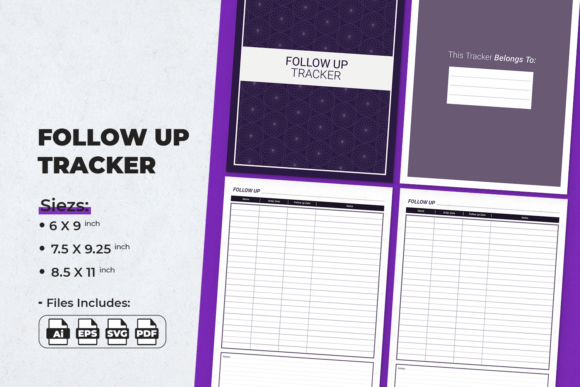
A well-designed Follow Up Tracker Planner Template often includes dedicated fields for:
- Contact/Item Details: Who or what is the subject of the follow-up? This clarifies the focus.
- Date Initiated: The starting point. This is crucial for tracking timelines and cycles.
- Follow-Up Date: The target date for your next action. This drives discipline.
- Action Required: A specific description of the next step (e.g., “Call,” “Send revised document,” “Confirm meeting”).
- Status/Notes: An open area for recording outcomes, updates, or contextual information from previous interactions.
This minimalist, functional layout prioritizes usability. The goal isn’t to create a complex log but a clear action map. For example, a small business owner might use it to track customer inquiries, noting that a follow-up on a service quote should happen three days after the initial contact if no decision is made. This turns a vague intention into a scheduled task.
The Significance of Physical vs. Digital Trackers
While digital apps abound, physical trackers—like printable templates—hold distinct advantages. They offer tactile engagement, eliminate the distractions of notifications and other apps, and can be customized instantly with a pen. They fit seamlessly into binder systems for hole-punching, making them ideal for integrated planner setups. Furthermore, a physical page serves as a singular, focused workspace for your follow-up tasks, which can enhance concentration and commitment. In education, a student might use a tracker to monitor follow-ups with professors on research topics or with classmates on group project tasks, finding the physical act of writing more concrete and accountable.
From Template to Toolkit: Files, Formats, and Flexibility
A modern, ready-to-use follow-up system isn’t just a single PDF. It’s a versatile toolkit designed for various needs and production methods, perfectly suited for integrating into a low-content book business or personal productivity arsenal.
Understanding the Included File Formats
A comprehensive package, as described, typically includes multiple file types, each serving a unique purpose:
- AI Illustrator & EPS Files: These are editable source files for designers. They allow you to modify colors, fonts, or layout elements before printing or digital distribution, offering complete creative control.
- SVG Files: Scalable Vector Graphics are useful for web use or further digital editing, maintaining quality at any size.
- High-Quality Print PDF with Bleed: This is formatted for professional printing. “Bleed” ensures that if the design has background colors or elements that should go to the edge of the page, they won’t have unwanted white borders when trimmed after printing.
- KDP-Ready PDF: Specifically tested and formatted for seamless uploading to Amazon’s Kindle Direct Publishing platform, adhering to their technical requirements for interior files.
- Standard PDFs: For easy home or office printing.
This variety underscores the practical relevance of such a product. It’s not a static, one-size-fits-all item. It’s a adaptable resource. A creative entrepreneur, for instance, might use the AI file to tailor the tracker with their brand colors before selling it as part of their own printable planner shop.
Sizing Details and Their Applications
The inclusion of multiple standard sizes (8.5" x 11", 7.5" x 9.25", 6" x 9") directly addresses different user preferences and publishing standards.
- 8.5 x 11 inches (US Letter): The most common size for home printers and North American binders. It’s spacious, allowing for ample writing room.
- 7.5 x 9.25 inches: A popular size for many bound notebooks and planner books, offering a more compact but still comfortable format.
- 6x9 inches: A favored size for Amazon KDP journals and books, providing a portable, trade-book-like feel.
Each size, with its safe margins for hole punching, ensures the product is physically robust and ready for integration into existing systems. This thoughtful design consideration means the template works for the solo freelancer printing at home for a ring binder and for the KDP publisher uploading a PDF for a mass-produced paperback planner.
Integrating Follow-Up Tracking into Modern Life and Work
The utility of a dedicated tracker extends far beyond traditional business. Its principles are universally applicable.
For Professional and Business Excellence
In business, consistent follow-up is directly linked to sales conversion, client retention, and project management. A tracker systematizes what is often an ad-hoc, personality-dependent process. It ensures a sales team treats every lead with the same disciplined sequence. It helps a manager track action items from meetings with every team member. It turns networking from a collection of random contacts into a curated list of relationships to nurture with planned touchpoints.
For Personal Life, Education, and Creative Projects
Consider personal applications: following up on healthcare appointments, checking in on family commitments, or tracking progress on personal goals like learning a skill. In education, students can track follow-ups on scholarship applications, research inquiries, or feedback requests from tutors. For creative projects—writing a book, producing music, organizing a community event—a tracker can monitor submissions to agents, feedback from collaborators, or promises made to volunteers. The template becomes a central hub for all “open loops” in one’s life.
The Technological Synergy: Bridging Analog and Digital
While this guide focuses on physical, printable templates, their role in a tech-enabled world is complementary, not competitive. Many users find a hybrid system most effective: using a digital calendar for date alerts (“Follow up with X on Friday”) but using the physical tracker sheet for the rich context, history, and notes. The printable tracker serves as the master list, reviewed weekly, while digital tools provide the daily reminders. This leverages the strengths of both: the depth and focus of paper, and the automation and alerts of technology.
Building a Sustainable Follow-Up Habit
Owning a great template is the first step; using it effectively is the journey.
Implementation Strategies for Beginners
Start simple. Choose one area of life—perhaps work emails or personal promises—and commit to logging every pending follow-up for one week. Review the tracker each morning. The act of writing it down already increases the likelihood of completion. Don’t over-complicate the categories initially; let the minimalist design of the template guide you.
Advanced Applications for Experienced Users
For those already familiar with productivity systems, the tracker can be integrated into broader methodologies like time-blocking or weekly reviews. You might dedicate a “Follow-Up Block” on your calendar each Friday afternoon, using your tracker as the source list for that block. You can also use it to analyze patterns: Are certain types of follow-ups consistently delayed? Do some contacts require more touchpoints than others? The tracker becomes a data source for optimizing your interaction workflows.
Conclusion: The Unifying Power of a Simple System
A Follow Up Tracker Planner Template, especially one designed with the quality, flexibility, and practical features outlined here, is more than just a piece of paper or a digital file. It is a manifestation of a principle: that intentional, systematic action builds trust, achieves results, and reduces stress. Whether printed endlessly on a home printer for personal use, professionally published via Amazon KDP, or edited creatively for a commercial venture, it serves a fundamental human and professional need—to honor commitments and nurture connections proactively. By adopting such a system, you equip yourself not just with a tool, but with a framework for reliability and excellence in whatever sphere you choose to apply it.